
Ledger Nano S was first released in 2016 and retired from sale in June 2022. Its replacement, the Nano S Plus, has a larger app capacity, USB-C and newer hardware. The original Nano S is no longer in Ledger’s current product comparison, so new buyers should not seek old or second-hand inventory.
2026 status for existing owners: A working Nano S does not automatically expose funds merely because the model is discontinued. Open the official Ledger Wallet app (formerly Ledger Live), check whether it offers a genuine firmware update, and confirm that the apps and assets you need are still supported. Consider migrating if the device cannot run current apps, its screen or buttons are failing, or you want newer transaction-display and ecosystem features. Never type the 24-word recovery phrase into Ledger Wallet, a browser, a form or a support chat.
The final (and special) edition was called Ledger Nano S Final Edition. It came with a POAP card that allows you to claim an exclusive NFT created by the artist “what is real?”. However, it is sold out.
New buyers should compare the current Nano S Plus and Ledger’s other current signers rather than buy a used Nano S. Check out our review of the Nano S Plus here. Prices vary by location, taxes and promotions, so check Ledger’s official store rather than relying on a fixed article price.

Key features of the Ledger Nano S
- Top of the line security to keep your cryptocurrencies safe and secure from hackers.
- Affordable price- suitable for beginners who want a cheap and reliable hardware wallet.
- Unique staking features so you can EARN cryptocurrency whilst keeping them secure. Learn more about staking here.
Staking and Earning
2026 note: Ledger Wallet integrations, supported assets and third-party staking providers change over time. Staking is not interest guaranteed by Ledger: it can involve validator, protocol, slashing, liquidity, tax and smart-contract risks. Verify current support for the exact asset and country in the official app.
Ledger Live allows for staking a growing number of coins, including ETH (Ethereum), SOL (Solana), ATOM (Cosmos) and DOT (Polkadot). Users can lock up their cryptocurrencies and in return they get interest. This feature expands Ledger into more than just a secure place to store your cryptocurrency. It can even help you grow your digital assets.
Depending on the coin, staking can be done natively on Ledger Live, or through a dedicated wallet. For example Yoroi Lite for ADA (Cardano). Staking is done in 3 simple steps for coins that can be staked on Ledger Live.
First, freeze your assets by logging onto Ledger Live. Choose the relevant account for the asset you wish to stake and click “earn rewards”. A popup window will appear. There you will be allowed to select the amount in your wallet you wish to freeze. Secondly, vote for your validator(s) who will be making the blocks on your network. The cryptocurrency earned by making these blocks will be redistributed to voters. Lastly, claim your rewards by clicking “Claim” in your relevant account. Rewards are claimable every 24 hours.
Swapping
2026 note: Swap providers, availability, fees and identity requirements are dynamic. Ledger supplies the interface, while execution is performed by third-party providers. Review the provider and transaction on the device before approving it.
Ledger has released a Ledger Swap feature which allows users to exchange their cryptocurrencies through Challengly, Wyre, Paraswap and 1inch. You send your cryptocurrency from your device to the exchange, which will then send you back the swapped cryptocurrencies.
To swap you will need: Ledger device, Ledger Live, the app for the crypto you want to swap and receive, and the exchange app.
Lending
Historical feature context: The integrations below describe services promoted when this review was written. DeFi lending positions can lose value through smart-contract failure, oracle problems, liquidation or stablecoin depegging, and an old Ledger Live workflow should not be assumed to remain available.
Ledger is working with Compound (COMP), Aave (AAVE) to allow users to lend DAI, USDT and USDC through their decentralised finance (DeFi) protocols. The purpose of doing this is that the lender could earn an interest on their loan. Ledger Live has also integrated with Alkemi Earn. This is a lending-borrowing protocol that utilizes a permissioned liquidity pool of digital assets comprising ETH, wBTC and stablecoins. The purpose of which is to generate yield for liquidity providers.
There are numerous benefits when using Ledger to lend:
Control: You have control and proof that the crypto you lend and generated interest belong to you. When you lend on Compound, you receive cTokens as proof of ownership of lent cryptocurrencies and generated interest. You can redeem your assets and interest by sending cTokens back to the smart contract.
Security: cTokens are stored on your ledger hardware wallets.
Convenience: Compound’s lending features are available directly through Ledger Live.
You can lend crypto using Compound or Aave and Ledger Live in 3 simple steps. Firstly, on Ledger Live’s Manager, install the application for the cryptocurrency you want to lend and create an account. Secondly, enable your account to authorise Compound/Aave’s smart contract to interact with your account. Finally, select the amount of cryptocurrencies you want to lend and issue a transaction to Compound/Aave. Verify and approve the transaction on your device.
Security Features
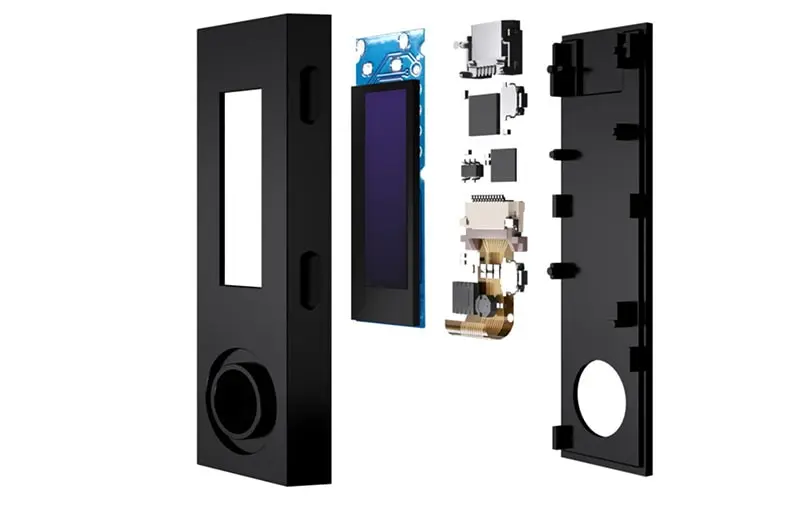
One of the key reasons to buy Ledger hardware wallets is the firms reputation for security. Cryptocurrencies hardware wallets are like bank accounts – they contain full access to funds and need banking grade security. Ledger Nano S contains two hardware chips:
- Secure Element: ST31H320 (secure) is independently certified CC EAL5+ and stores the private key and signs transactions
- Operating system: STM32F042 chip is responsible for Ledger’s BOLOS proprietary Operating System.
Secure elements are separate chips designed to make key extraction and tampering more difficult. Certification and isolation increase resistance to some attacks, but no chip or wallet can guarantee that an account cannot be compromised through a malicious transaction, exposed recovery phrase, supply-chain attack or implementation flaw.
Even if hackers or malware compromise your computer, the Ledger will still keep your cryptocurrencies secure. Devices like the Trezor One and Trezor Model T have chosen not have secure elements. And so only have a single layer of security.
Ledger announced in 2019 that the Nano S had received France’s CSPN first-level security certificate from ANSSI. That historical certification should be evaluated alongside the device’s age, current firmware and app compatibility; it is not a lifetime guarantee or proof that every Ledger model has the same certification.
Similar to the Nano X, users can also protect their funds using a PIN code and passphrase. The PIN code is to generally unlock your device to use it. Whilst you can also set up wallets protected by a passphrase in addition to your primary PIN code.
If someone threatens you to unlock your device, you can give them the PIN code to access wallets with fewer funds. Meanwhile, passphrase protected wallets contain the bulk of your crypto assets.
Ledger firmware version 1.6: security enhancements
With firmware version 1.6., the security of the Nano S has been further enhanced.
- 24 words recovery phrase confirmation has been simplified and shortened. Now for each of the 24 words of the recovery phrase, users will only choose among 4 words. Therefore making it much easier to get through the process;
- The Nano S now has the Control Center feature that was originally on the Nano X. Allowing for functions such as accessing settings, locking device or deleting applications possible directly on the device;
- Added support for Bitcoin Taproot upgrade;
- Added support for the seed derivation algorithm EIP-2333. Thus allowing you to securely sign a deposit contract transaction for Ethereum 2.0 on your device;
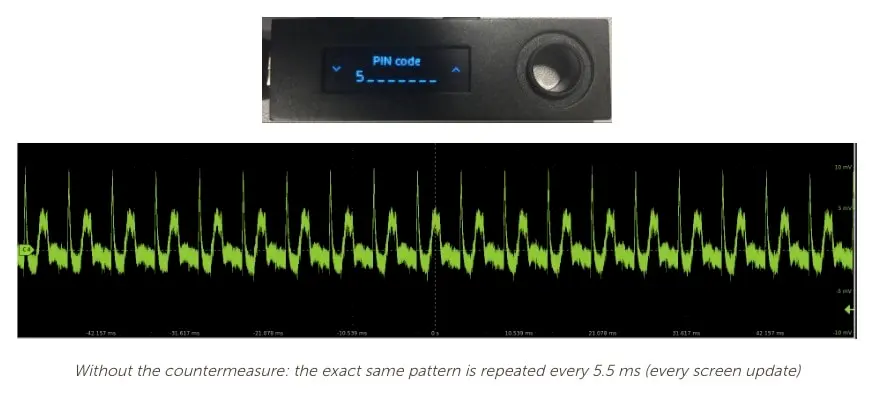
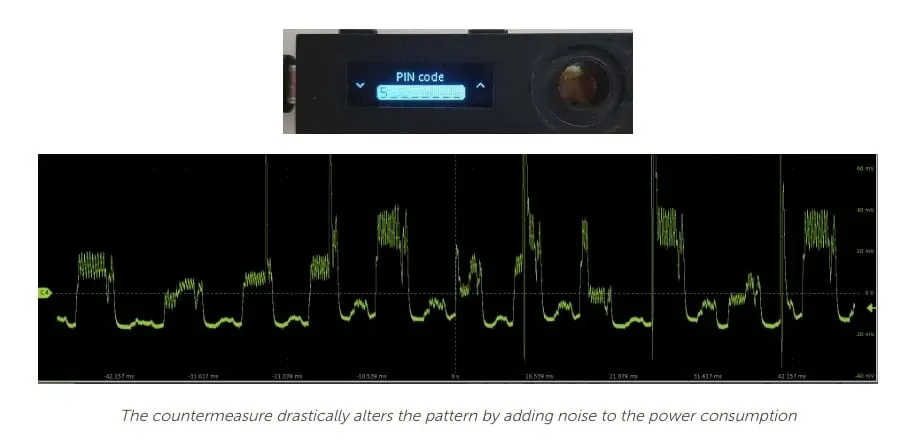
After the update, we find that being unable to enter PIN code digits in order anymore may be slightly inconvenient. However with cryptocurrencies, security always comes up top over convenience. And with the added partial screen inversion, we see that Ledger’s bounty program is not just a PR stunt. Ledger actually looked into submissions and made the security improvements even when the suggested hack was only hypothetical.
Ledger Hack?
In July 2020, Ledger confirmed that an unauthorized third party accessed its e-commerce and marketing database. Ledger subsequently reported that names and contact details for a larger group were exposed, including postal addresses for a subset of customers. The incident created lasting phishing and physical-security risks for affected customers even though it was separate from the Nano S Secure Element.
Ledger had reported the matter to authorities and are working with Orange Cyberdefense to investigate.
Subsequent the breach, users have reported receiving phishing emails and texts. These emails and texts ask users to download a new version of the Ledger software. Clicking the email link redirects users to a fake Ledger site. If users download the “update”, it asks for their Ledger’s recovery phrase but is actually malware. The attacker uses the entered recovery phrase to recover the user’s wallet and sends the user’s cryptocurrencies to the attacker’s wallet. For a full explainer on how the phishing attack works see the report from Kraken.
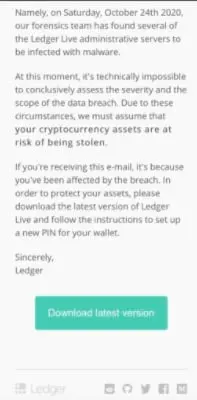
This incident was a customer-data breach rather than extraction of private keys from Nano S devices. However, follow-on phishing did put users’ funds at risk if they entered recovery phrases into fake update software. Treat the device screen as the source of truth and download Ledger Wallet only from Ledger’s official domain.
The Nano S architecture remains materially safer than keeping private keys in an ordinary browser or exchange account for many threat models, but an unconditional “5/5” score would obscure phishing, recovery and aging-device risks.
Multi-Currency Support
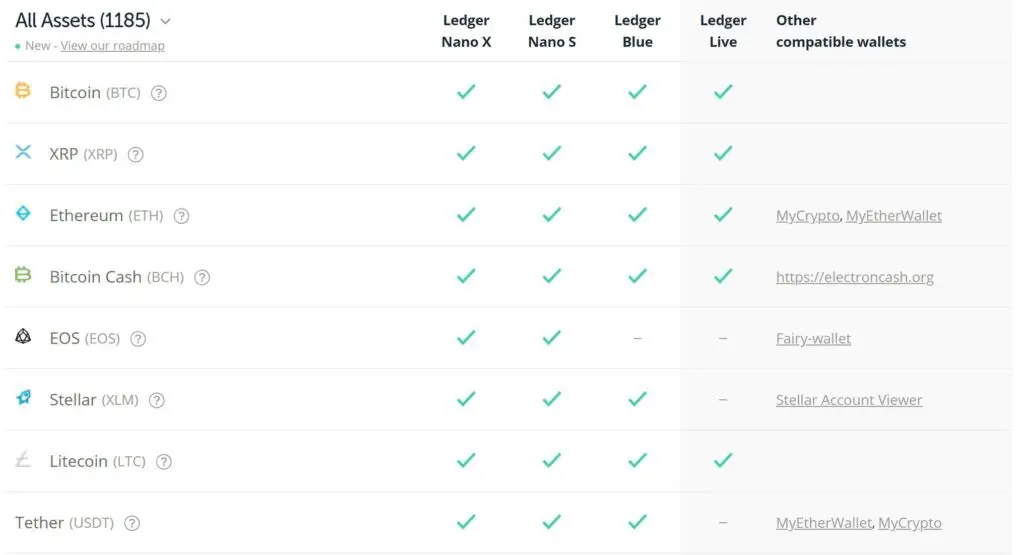
Ledger has one of the most diverse support for different cryptocurrencies such as Algorand (ALGO), Solana (SOL) and Chainlink (LINK). With their open policy to development from project teams, the Ledger Nano S supports 1800+ different assets. Many of these assets like Vechain or NEO are not found on competitors like the Trezor Model T or KeepKey. Thus making Ledger the only hardware wallet available for many coins.
One of the initial weaknesses of the Nano S was that it only fit 2-3 apps on the device. However Firmware Version 1.6 allowed users to install 5-11 apps (depending on the type of app installed). This will certainly answer the prayers of a lot of average cryptocurrency holders who generally hold around 5-10 different coins.
If you need more apps, you can uninstall the ones you’re not using and reinstall them later. Uninstalling apps won’t delete coins and all account information will remain. The newly released Ledger Nano X fixes this problem by increasing the internal memory to 2 MB.
Ledger’s firmware update directly addressed a significant weakness in the Nano S. Whilst it still can’t beat the Nano X in terms of multi-currency support, it is good enough for most traders. For this reason, we give our thumbs up and bumped the score up from 4/5 to 4.5/5 for multi-currency support.
Hardware Design
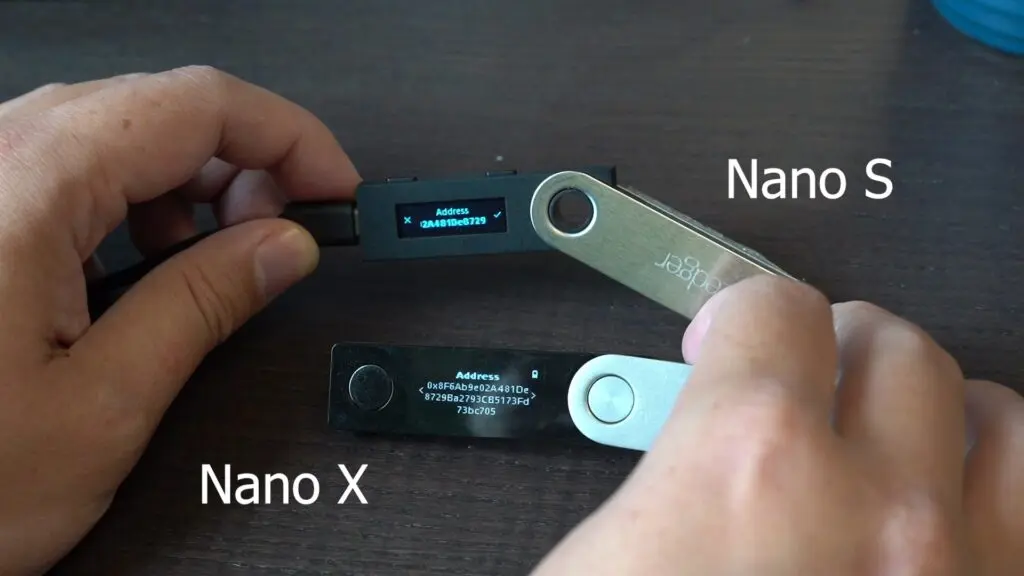
Ledger Nano S has two hardware buttons – located on the top of the device. These two buttons allows us to access menus (hold both buttons), make selections (press both buttons). And even input recovery phrases (use buttons to scroll). We found that entering PINs and recovery phrases to be tedious with only 2 buttons. Perhaps a touchscreen or additional buttons could have helped?
With the update 1.6, the Ledger Nano S has an improved display UI. So, the device displays the full cryptocurrency address without the need to scroll. This allows for easier verification of the target destination. The Nano S uses a USB micro-B interface for charging and connecting to the PC.
Ledger previously committed to continued Nano S improvements, but existing owners should base a 2026 decision on what the official app currently supports rather than an open-ended promise made years ago. The limited storage, micro-USB port and small two-button display are the main reasons to migrate even if the device still works.
Why Use a Hardware Wallet
With traditional currencies, you, the user, are the most important person. If you have ever lost your bank card, you can always go to the bank with some sort of identification and request for access back to your account.
Cryptocurrencies, however, don’t care about the physical person but rather the private key associated with the wallet. You use the private key to verify the account and transactions. Anyone with access to the key can send funds, so you must keep it safe. Additionally, you cannot reverse cryptocurrency transactions.
Hardware wallets can reduce these risks by keeping transaction-signing keys isolated on the device. They are not invulnerable: malicious firmware or software, supply-chain tampering, physical access, an exposed recovery phrase, or approving a deceptive smart-contract transaction can still lead to loss.
Is Ledger Nano S worth using in 2026?
In short, the answer is: not really. Ledger has retired the Nano S and even the Ledger S Final Edition. Both are no longer available for sale on the official site. This means that the only places where you’ll be able to buy them are 3rd party sellers or second hand. We highly advise against both options because someone might have tampered with the device.
Existing owners can keep using a functional Nano S if the official Ledger Wallet app recognizes it, current firmware and the required coin apps are available, and the display and buttons allow every transaction detail to be verified. Upgrade when any of those conditions fails or when limited app storage becomes impractical. A replacement does not require entering the recovery phrase into a computer: either send assets from the old working device to addresses generated by a newly initialized wallet, or restore only on a trusted compatible hardware device after confirming the recovery process.
Learn how to properly setup your Ledger Nano S with our guide.
Product Specifications (Technical Specifications)
Ledger Nano S Product Specifications:
| Processors | ST31H320 (secure) + STM32F042. |
| Compatibility | 64-bits desktop computer (Windows 8+, macOS 10.8+, Linux) excluding ARM Processors. Also compatible with smartphones (iOS 9+ or Android 7+) via OTG cable. |
| Connector | USB micro-B |
| Security Certification | CC EAL5+ |
| Size | Size: 56.95mm x 17.4mm x 9.1mm Weight: 16.2g |
| Supported Assets | Varies by current app and third-party wallet compatibility; verify the exact asset |
Frequently asked questions
Is Ledger Nano S discontinued?
Yes. Ledger retired the original Nano S from sale in 2022. Nano S Plus is a different, current model with USB-C, more app capacity and newer hardware.
Do existing Nano S owners need to move their crypto immediately?
Not solely because sales ended. First confirm that the official Ledger Wallet app recognizes the device, offers any required firmware update and supports the apps you need. Migrate if you cannot verify transactions reliably, the hardware is failing or required apps are no longer compatible.
Is Ledger Nano S the same as Nano S Plus?
No. The Nano S Plus is the successor. It has USB-C, substantially more application capacity and a newer CC EAL6+ Secure Element, while the original Nano S uses micro-USB and has much tighter storage limits.
Should I buy a used Ledger Nano S?
No for meaningful funds. The model is discontinued, and a used or unverified device adds supply-chain and tampering risk. Buy a current device from Ledger or an authorized seller and generate the recovery phrase yourself during setup.
Will upgrading from Nano S change the recovery phrase?
Not necessarily. A compatible new hardware wallet can restore the same accounts from the existing phrase, but the phrase must be entered only into the trusted hardware-device recovery flow, never a computer or website. For stronger compartmentalization, initialize a new wallet and transfer assets onchain instead.
Share
Found this useful?
Share it with someone who'd want to read it.
Related
Trezor Safe 5 Review (2026): Best-Balanced Trezor
Trezor Safe 5 adds a touchscreen and haptics to open-source EAL6+ security for US$169. It is the best-balanced Trezor for regular USB-C use.
Trezor Safe 3 Review (2026): The Best US$79 Cold Wallet?
Trezor Safe 3 offers open-source cold storage and an EAL6+ Secure Element for US$79. Best for holders who accept a tiny screen and no iPhone support.
Ledger Stax Review (2026): Is the $399 Wallet Worth It?
Ledger Stax offers a curved E Ink screen and Qi charging for US$399, but not stronger key protection. It suits design-first buyers, not value seekers.