
Updated: 13 August 2026. EtherDrops is now marketed by DropsTab as Drops Bot. It remains active, but the interface, supported networks, limits and subscription tiers have expanded since this tutorial was written.
Drops Bot status and changes in 2026
DropsTab’s current product page reports 27 supported networks, more than 100,000 unique users and over 10 million notifications per day. In addition to coin, wallet, NFT, gas and DEX alerts, the service now advertises tracking for open long/short positions and liquidations. Its paid plans also include Polymarket-event tracking.
Those figures and features supersede the article’s 2022 claims of five networks, 400,000 users and five million daily notifications. They are vendor-reported statistics, not independently audited usage data. Menu labels may also differ from the screenshots below, but the core flow remains: open the official Telegram bot, add a public address or asset, choose an alert type and set a threshold.
Is Drops Bot safe?
Wallet monitoring is read-only: a public address is enough to observe public blockchain activity. The bot does not need a seed phrase, private key, wallet connection or signed message. A bot or support account asking for any of those is fraudulent.
Read-only does not mean private. Adding an address associates that address with your Telegram interaction and tells the service which wallets interest you. Avoid adding an identity-sensitive wallet if that correlation is unacceptable. Notifications can also expose balances or trading activity on a lock screen or in a shared Telegram group.
Start from the official Drops Bot product page or its verified link to Telegram. Fake bots can copy names, avatars and menus, so do not rely on Telegram search alone.
Original EtherDrops review and tutorial
The walkthrough below is preserved from 2022. It still explains the main alert concepts, but network lists, menu wording, plan limits and individual integrations may have changed.
EtherDrops is a Telegram based bot designed to track major crypto markets and NFTs. Many crypto enthusiasts would use data tracking sites such as CoinMarketCap and CoinGecko, and these tools are excellent as ‘wikipedias’ for all the altcoins out there. However, for those with more advanced needs, there are much better resources available that can make your life easier.
If you’ve been in crypto for several years, you’ll probably have a Telegram account. Most of the crypto projects in existence have official Telegram channels to keep their communities informed and up to date on developments, so the chances are you also use the messaging platform.
This is just as well, because one thing that makes Telegram very useful is its ability to add bots that serve different purposes to the end-user. This is where EtherDrops comes in, so you can be part of the various crypto communities and track your tokens all on the Telegram app.
What is EtherDrops?
Originally created in 2018 as a tool to monitor Ethereum wallets, EtherDrops was mainly used to track the transactions of Ether ‘whales’ as well as one’s own wallets on the first smart-contract blockchain.
Four years later, EtherDrops has evolved into something much bigger than wallet monitoring. It is now integrated with Ethereum, Polygon, Fantom, Avalanche and BNB Smart Chain, providing a convenient place to track all your crypto activities within one Telegram bot.
Users are equipped with simple-to-use tools to follow coin prices, as well as track and receive real-time notifications on wallet transactions, DEX and CEX swaps, NFTs, liquidity pools, Binance funding, gas prices, and more.
By shaping settings according to your own personalized needs using a unique combination of advanced tools and instruments, EtherDrops becomes a simple yet essential bot that notifies you about anything you want, or alerts you to certain conditions. Thousands of investors, traders, and holders use it to navigate their crypto journeys.
The bot already has more than 400,000 users on board and keeps growing steadily. With the product sending over 5,000,000 notifications daily, it’s no surprise that each day they welcome hundreds of new users onboard.
EtherDrops Features
Major features of EtherDrops include:
- Price tracking;
- Wallet tracking;
- Liquidity pools;
- OpenSea integration;
- Gas price notifications;
- Integration with Telegram groups and channels; and
- Token distribution alerts.
Price Tracking
Tracking the prices of various cryptocurrencies is a basic need for long-term investors or traders. Add coins by name, ticker or contract address. Apply your personalized settings to receive instant notifications about price changes and swaps.
- Price Change Notifications – Set % Price Change to generate an alert.
- Swap Alerts – Set $ Value to track Swaps on Uniswap, Sushiswap, Balancer and other supported DEXs.
Wallet Tracking
Add a wallet by its address to monitor incoming and outgoing transactions, airdrops, NFT transactions, and created contracts.
- Transaction Notifications – Choose between different event types and set $ alerts to be notified about transactions.
- Wallet Balance – Check Balances of assets and NFTs.
Liquidity Pools
Add a liquidity pool by its contract address and receive % pool changes should it increase or decrease within the specified range.
- LP Changes – Set the % change value to stay on top of your added pool.
OpenSea Integration
Track the floor price and metrics of NFTs and arts on the Ethereum network. To follow your collection, add it by the name or address and set a % price change or generate a $ price target.
Gas Price Notifications
At times ETH gas prices can be really high and leave you with an eye-watering bill in fees to pay if you make a transaction. Set gas price notifications and save yourself a fortune!
- Set Gas Alerts – Set Gwei amount to generate an alert. As soon as it hits the target or lower, you’ll be immediately notified.
Check out our Advanced Tips and Tricks to Save on Ethereum Gas Fees:
Integration with Groups & Channels
If you are an admin or a community manager of a project using Telegram, or you run a trading group, your channel could benefit from integration with the EtherDrops bot.
- All Bot Features in your Groups and Channels – The same alerts and notifications you set in your individual account can be applied to groups and channels.
Token Distribution Alerts
Token distributions often create market price pressure and increase capitalization. Be the first to obtain such info and assess market conditions to make a play in your favor (if you use Margin or Futures trading).
- Token Distribution – Receive distribution alerts from seed, private and other events for tokens that you’ve added to monitoring.
Tutorial: How to use EtherDrops
1. How to install EtherDrops bot
To install EtherDrops, start from the current Drops Bot product page and use its Telegram link. It will automatically link the bot to your account. Older official materials listed several mirrored bot usernames to handle load, but the product page is the safer current source if those names change.
2. How to add a wallet
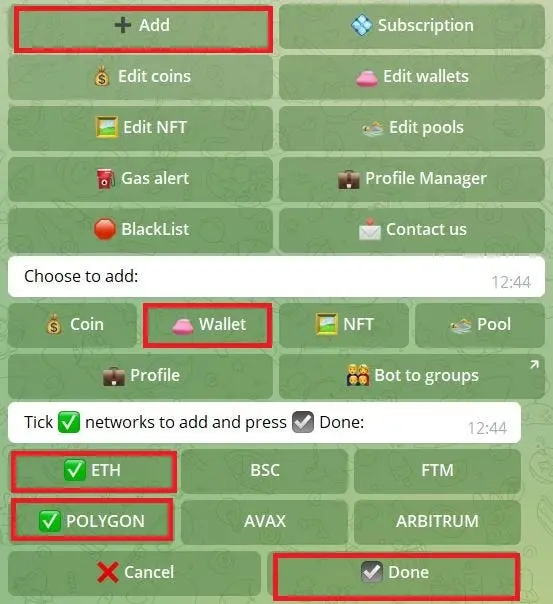
In the Main Menu, select “+Add wallet”. Tick ✅ which networks you wish to add to monitoring for your wallet and press ✔ Done (for example ETH and Polygon). Then type in your wallet address and name it. You’ll now be immediately notified whenever there are any transactions happening within the wallet, including NFT activity, in/out transactions, airdrops, etc.
3. How to edit wallets
In the Main Menu, select “Edit Wallets”. Choose the wallet you wish to edit. The menu with available options will open up. You can Delete, Rename, make it your Favourite (if ON, notifications with this wallet will be illuminated for better visibility), follow only IN, OUT or ALL transactions, check Balances, add/remove Networks for this wallet, set Alert Transactions filter (you’ll only be notified about transactions that are bigger than the specified threshold).
4. How to add a liquidity pool
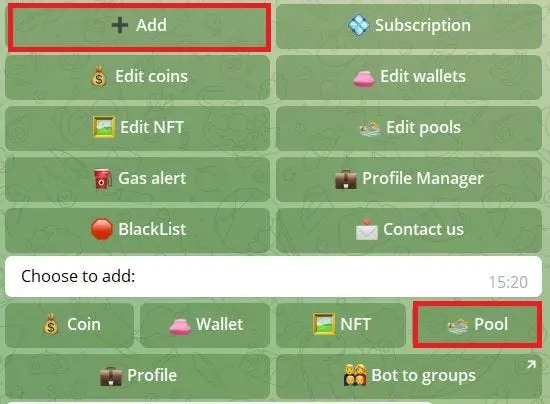
In the Main Menu, select “+Add pool”. Choose the network. Next, enter the address of the liquidity pool. Enter the % liquidity change to create a notification. When the liquidity of a pool changes within your specified range, you’ll be instantly notified.
5. How to edit liquidity pools
In the Main Menu, proceed to “Edit pools”. Choose the liquidity pool to add additional settings. You can Delete, Rename, turn your Notifications ON or OFF for this specific pool, or change the % notification alert.
6. How to add a new coin
In the Main Menu, select “+Add coin”. Next, enter the contract address, symbol, or name of the coin. Choose the coin from the list and select network (ETH, BSC, ERC-20, Polygon, or CEX). Finally, enter the % price change and $ value for swaps (in case the coin is traded on a DEX) to create a notification. Now you are following this coin. Whenever there is a swap or price change within the range you specified, you’ll receive an instant notification.
7. How to edit coins
In the Main Menu, proceed to “Edit coins”. Choose the coin. You can Delete, turn your Notifications ON or OFF for this specific coin, change Price Denomination (in USD, BNB, ETH, BTC), change the price % notification alert, create a price alert (if a coin is x USD, you’ll receive a notification), or change swap alerts.
8. How to add an NFT
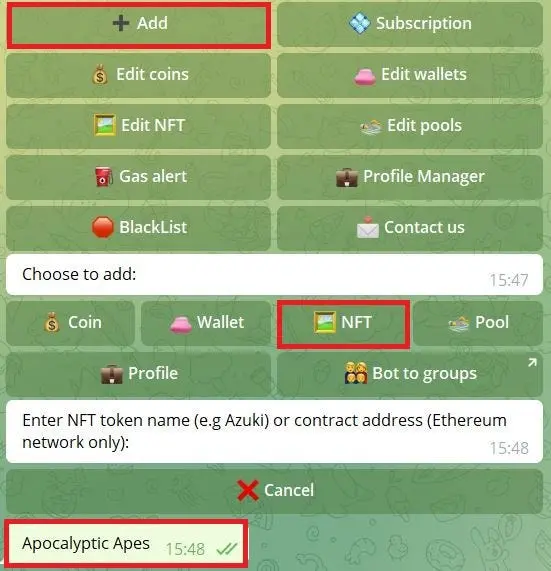
In the Main Menu, select “+Add NFT”. Enter the contract address or name of the NFT. Select the right one and type in the % price change alert to receive notifications.
9. How to edit NFTs
In the Main Menu, select “Edit NFT”. Choose the NFT. You can Delete, change % alert or price, set a new price alert, or turn notifications ON/OFF.
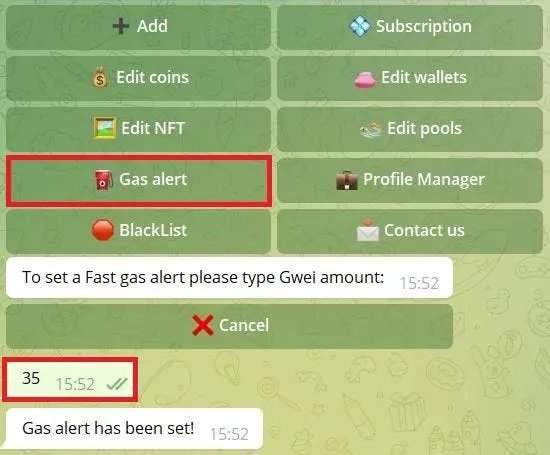
10. How to set gas price alerts
In the Main Menu, select “Set gas alert”. Type in the desired fast gas price to create an alert.
Conclusion
EtherDrops is a simple yet comprehensive one-stop tool for all your crypto tracking needs and continues to add new networks, coins, and exchanges as the market expands so you’ll never be short of what you need. It just takes one click and a few easy-to-follow steps within Telegram to get set up, and that short initial setup time proves to be well worth it.
Drops Bot and EtherDrops FAQ
Is EtherDrops still available?
Yes. DropsTab now markets the service as Drops Bot, while EtherDrops branding and bot usernames may still appear in older links and parts of the interface.
Is Drops Bot free to use?
Yes. Drops Bot has a limited free Basic plan and several paid tiers. Wallet, coin, NFT, message and swap-alert limits vary, so check the current subscription page before paying.
Is it safe to add a wallet to Drops Bot?
Monitoring a public address is read-only and does not give the bot control of funds. Never provide a seed phrase, private key, password, wallet connection or signature to a tracking bot.
Does Drops Bot make wallet tracking private?
No. Blockchain addresses and transactions are public, and adding an address can associate it with your Telegram interaction. Do not track identity-sensitive wallets if that correlation is a concern.
How many networks does Drops Bot support?
DropsTab advertised 27 supported networks when checked in August 2026. The exact chain list can change, so verify support inside the bot before relying on an alert.
What can Drops Bot track?
Current features include coin prices, swaps, token unlocks, public-wallet transactions, open trading positions and liquidations, NFTs, gas prices, funding rates and group notifications.
Can Drops Bot track Polymarket events?
Yes. Current subscription plans list Polymarket-event monitoring. The number of tracked events depends on the selected plan.
Can Drops Bot be used in Telegram groups and channels?
Yes. Administrators can link alert profiles to groups or channels, but they should consider whether balance and transaction notifications expose sensitive information to members.
How can users avoid fake EtherDrops bots?
Start from DropsTab's official product page and follow its Telegram link. Check the exact username, ignore unsolicited support messages and never disclose recovery credentials.
Are Drops Bot alerts guaranteed to arrive immediately?
No. Telegram, network indexers, provider outages, plan rate limits and chain congestion can delay or omit notifications. Do not use a bot alert as the only protection for a leveraged position or security incident.
For a comprehensive historical tutorial on EtherDrops features such as quick shortcuts, special commands, profiles and group setup, read to the end of this guide. If TL;DR you can also watch a video tutorial here.
Drops Bot update sources
- Drops Bot product page — current features and vendor-reported usage
- Drops Bot plans — current limits and prices
- Drops Bot FAQ — setup and account help
- Official EtherDrops user guide — historical menus and fake-bot warning
Follow DropsTab / EtherDrops for more information:
Share
Found this useful?
Share it with someone who'd want to read it.
Related

Magic Square Guide: Magic Store, SQR and Web3 App Discovery
A current guide to Magic Square, covering the live Magic Store, community app validation, Magic Launchpad, SQR on BNB Smart Chain, memberships and risks.

Rainbow ($RNBW) token airdrop guide
Rainbow ($RNBW) is a cryptocurrency wallet that lets users manage tokens, NFTs, and cross‑chain swaps across Ethereum and Layer 2 networks.
Pact Swap Labs NFT Holder Airdrop: Complete Step-by-Step Guide
Pact Swap Labs is distributing 5 million $BOOST tokens to eligible NFT holders across Ethereum, Bitcoin, and Solana networks through…